

Course Setup > Course Readiness inspects every course you own and tells you what is missing. Run it before students start registering, and again whenever you add a section.
The three statuses
| Status | Meaning |
|---|---|
| Ready | Nothing outstanding. Students can register and will be graded. |
| Incomplete | The course works and grades correctly, but something is unfinished. Most often no students have enrolled yet, which is normal for a course you just made. |
| Needs attention | Something stops grading. Fix these. |
What it checks
Problems that stop grading:
- No assignments have been added at all.
- The Activity Tracker has no grading scale.
- The Activity Tracker has no start or due date.
- The assignment belongs to a different school or instructor than the course.
- The grading scale has no range between its lowest and highest rows.
- Graded days per week is set to zero.
- There are duplicate assignments of the same type.
Problems that leave the course working but incomplete:
- No students enrolled yet.
- The Fitness Assessment has no pre or post dates, or no tests selected.
- The Written Paper has no due date.
- Tracker dates fall outside the semester, or start after they end.
- No LMS gradebook column header, which only matters if you export grades.
Reading the page
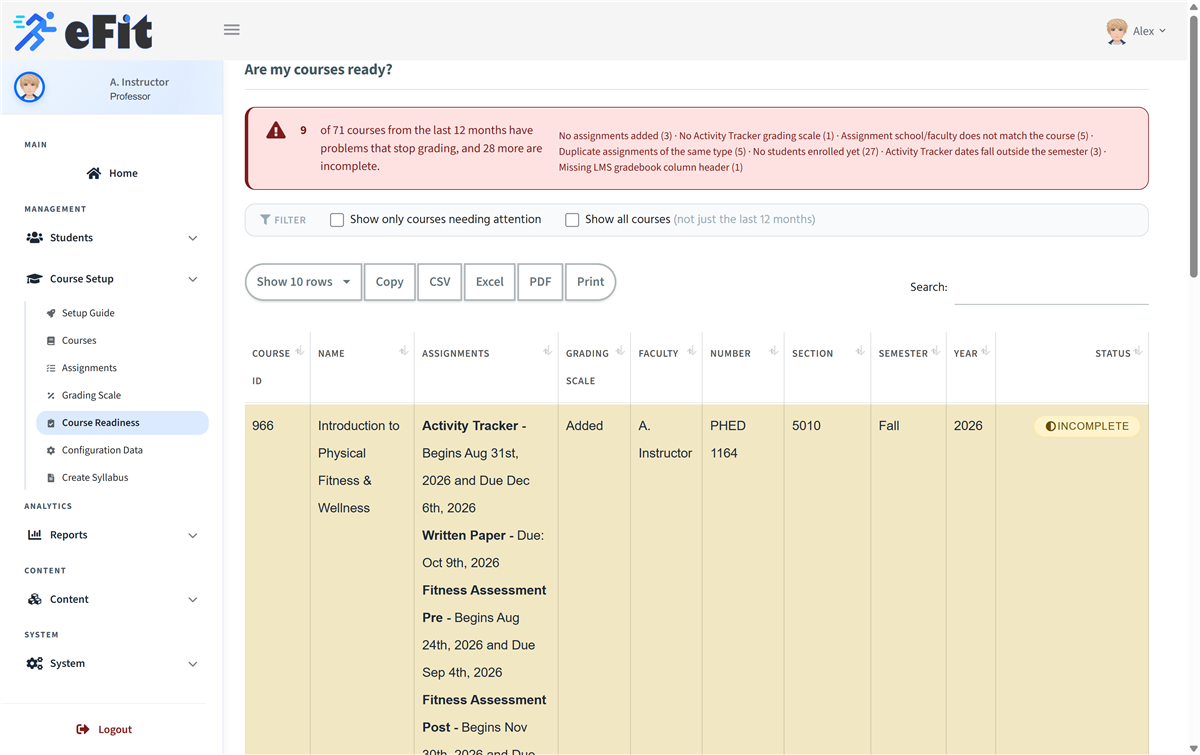
The banner at the top counts affected courses and breaks them down by problem. Tick Show only courses needing attention to hide everything that is fine. By default you see courses that started in the last twelve months; tick Show all courses for your full history.
Hover a status badge to see every reason for that course.
For a step-by-step version of the same information, open your Setup Guide.